Engineering teams
Review the exact screen, selector, quote, and severity before deciding what should be fixed.
Give Flock a product URL and a goal. Synthetic users work through the flow and flag where they got confused or stuck. Each finding comes with screenshots, page evidence, and a suggested fix.
Use it on previews and staging, in pull requests, or from your coding agent. No SDK required for URL-based reviews.
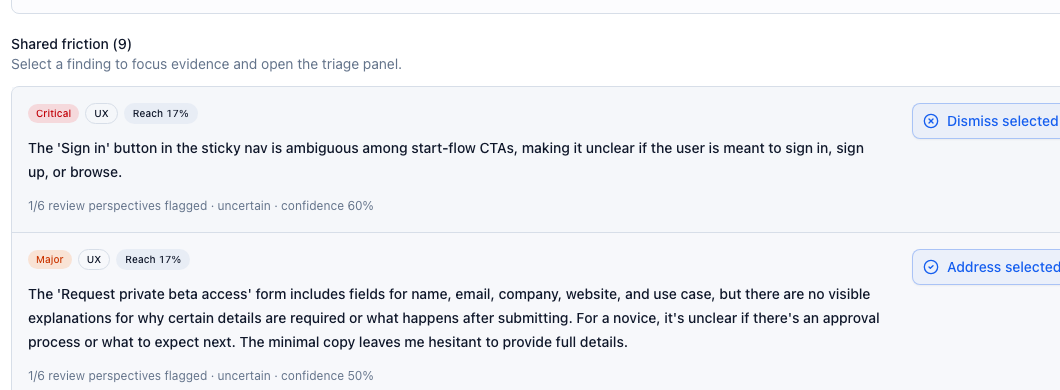
“For a novice, it's unclear if there's an approval process or what to expect next. The minimal copy leaves me hesitant to provide full details.”
Fix brief
Put the existing access-review and follow-up expectations beside the request form at every screen size.
Who it's for
Review signup, checkout, onboarding, and other critical flows before launch or after a change. Give engineering, product, and QA the same findings and browser evidence.
Review the exact screen, selector, quote, and severity before deciding what should be fixed.
See where users lose confidence without replacing product judgment with a generic score.
Add user-facing regression signal before launch, before merge, or after risky workflow changes.
Novice user
Can I complete the first task without support?
Low product knowledge, high sensitivity to unclear labels.
Busy operator
Can I get to the next step quickly?
Skims aggressively and treats delays as product risk.
Security admin
Can I trust what this workflow is asking me to do?
Reads copy and permissions as part of the product surface.
Skeptical evaluator
Is there enough evidence to keep evaluating?
Looks for contradictions before committing time or budget.
Example review
One real review of this site's access flow: what the persona tried, what it flagged, what we decided, and what we changed.
01Goal
Six review perspectives ran the same goal against the live homepage. One flagged the request form: it asks for details without saying why they are needed or what happens after submitting.
02Review the findings
We accepted the request-form finding. We dismissed the Sign in finding: one perspective in six flagged it at 60% confidence, and the link is meant for existing users rather than the start flow. Each decision stays attached to its evidence.
03Fix and review again
Use the accepted finding to scope a change, preserve the working behavior, and review the same flow again.
We made this change. The request form on this page now says what happens after you submit it. Open the request form to see it.
Fix brief
# Clarify the next step after requesting access

- Put the existing access-review and follow-up expectations beside the request form at every screen size.
- Preserve the invite-code path and the current access policy.
- Check that someone can find how to request access and understand what happens next.
- Review the same flow after the change and inspect the new evidence before calling it fixed.
In your development workflow
Check a pull-request preview from GitHub, or let your coding agent plan a review from the repository and carry the findings into a fix.
Connect the GitHub App. Flock reviews the PR preview, posts a check and a summary on the pull request, and comments inline where a finding maps to changed code.
Set up the GitHub AppConnect Codex, Claude Code, or another MCP client. The agent picks the flows your change affects, estimates the review, and runs it after you approve. Then it reads the findings and proposes a fix.
Starter prompt
Inspect this repository and my current changes. Identify the user flows most likely to be affected and propose a focused Flock review.

Show me the proposed target, personas, and estimate, then wait for my approval before launching. After the review, inspect the findings and evidence, propose a scoped fix, and review the same flow again.Internal private-beta review
Here are six. They were practical, not cosmetic: a checkout path sent users into public pricing, a plan gate disagreed with billing state, and a workspace flow ended without a next step.
These come from one internal review of our own product. They are not customer claims or an audited benchmark. Read the founder note.
Workspace setup
After creating a team workspace, users could not tell what had changed or where to go next.
Checkout path
The checkout back-link sent users out of onboarding and onto the public pricing page.
Plan state
A plan gate told an active Pro user that a Pro feature still required an upgrade.
Workspace copy
Technically correct copy made the product sound like it was asking for a different account model.
Pricing copy
Launch-scope changes left stale package language in the pricing copy.
Review context
A useful finding needed clearer evidence, decision state, and fix context before a teammate could accept it.
Public walkthrough
The same shopper goal run against Amazon's 1999, 2010, and 2024 homepages, with the captured screens and findings for each.
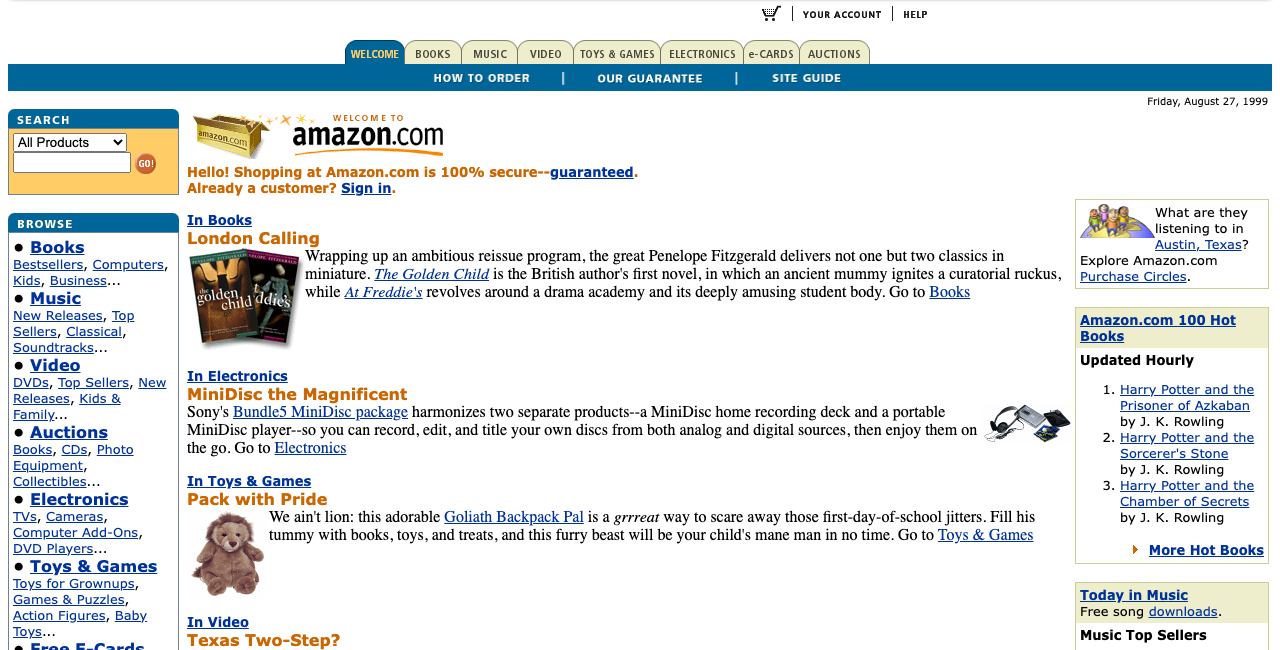


Uses public Internet Archive snapshots. A Flock-curated demo, not a customer case study. Not affiliated with or endorsed by Amazon.
Open the public walkthroughCurrent beta pricing
Compare included monthly runs and seats. Prepaid extra usage is $0.15 per run on every plan.
$59/mo
$47/mo with annual billing
$179/mo
$143/mo with annual billing
Starts at$400/mo
4-seat minimum; additional seats at $100/seat/mo
A run is one successful analysis of a page or step. A review can use multiple runs across its personas and steps. Included runs reset monthly, including on annually billed plans. Example: four personas on a three-step signup flow use about 12 runs.
View pricing detailsPrivate beta access
Tell us which preview, staging, or release workflow you want tested first. We prioritize teams with active product surfaces and concrete evidence needs.
Have an invite code?
Codes are for teams already approved for the private beta.
Need beta access?
Share the workflow, product surface, and team context that would make Flock useful now.
Request accessWe collect only the fields in the request form and do not use waitlist submissions for third-party marketing.
Prefer to talk first? Email the founders.